Direction Button (Sp Dr S 600)
Contents | FAQ | Manual | General Tips and Tricks | Change Log | Multiplayer Manual | Line Operations Manual | Voice Communications | Change Log | Developers pages

Purpose
The Direction Button (EaGT) is used to change the direction of automatic blocks. Neighbouring dispatchers can only send you trains when the direction flag of the connecting automatic block is set towards you.
Operation
The following images are based on the assumption that the neigbouring PSB is on the left.
-
 Direction flag is towards own PSB
 -
 Direction flag is set towards neighbouring dispatcher
 -
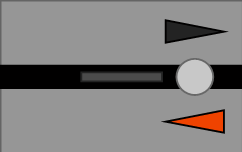 Direction flag is set towards neighbouring dispatcher, route set towards neighbour/block occupied.
 -
 Direction flag is set towards neighbouring dispatcher, route set towards neighbour/block occupied. Direction pre-set towards own PSB


To set the direction flag of an automatic block towards you, press EaGT together with the block direction button (EaT). When successful, the block direction will change and is reflected in the arrow indicators.
Note that you can only change the direction towards your own area. Unless you have both stations at the extremities of the open line on your own panel. If you want to change the direction outwards of your own area, you must contact your neighbour by phone or via ZNP801 to offer the train. Only your neighbour can change the direction to himself.
The direction towards your own PSB can be pre-set even though the track towards the neighbour is still occupied. This done by pressing EaGT together with the block direction button (EaT). The dirction flag towards the own PSB will blink white now. Once the track is cleared, the direction is changed. Pre-setting the direction can be cancelled by using the EaLT button together with the block direction button.