Direction Revoke Button (Sp Dr S 600)
Contents | FAQ | Manual | General Tips and Tricks | Change Log | Multiplayer Manual | Line Operations Manual | Voice Communications | Change Log | Developers pages

Purpose
The Direction Revoke Button (EaLT) is used to cancel the pre-setting of the direction of automatic blocks towards the own PSB.
Operation
When the direction of a block is set towards the neighbouring PSB, and the block section is still occupied, you can already prepare the change of direction towards your PSB. This is done by pressing the EaGT button together with the block direction button (EaT). The direction flag towards the own PSB will blink yellow in that case.
If the pre-setting of direction has to cancelled, the EaLT button must be pressed together with block direction button. The direction flag towards the own PSB will then go off.
The following images are based on the assumption that the neigbouring PSB is on the left.
-
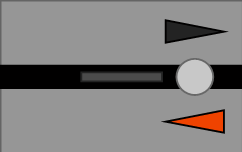 Direction flag is set towards neighbouring dispatcher, route set towards neighbour/block occupied.
 -
 Direction flag is set towards neighbouring dispatcher, route set towards neighbour/block occupied. Direction pre-set towards own PSB

